
DEMO AGENT
Demo Agent — Pamela
Nitrobots.ai has created an online demo of our VacancyZero.ai guest agent for hotels and resorts. This is Pamela: she recommends and books stays by webchat, and calls guests back to change a booking.
Demo Guide: The AI Concierge (Book, Then Change by Phone)
Try Now1. Demo Overview
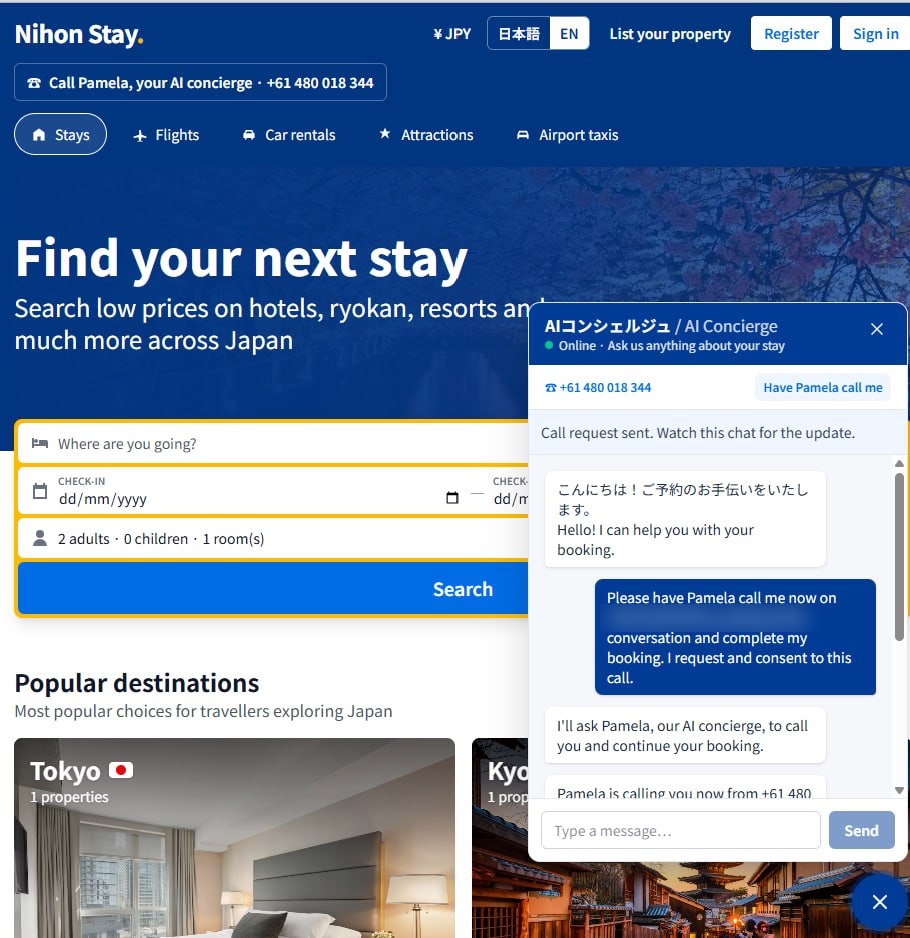
The Scenario: You are a guest planning a trip to Japan. On a sample hotel booking site (Nihon Stay), you ask the AI concierge to recommend and book a hotel. Then you ask her to call you, and you change the booking by phone.
Objective: To show how one agent handles the whole guest journey across chat and voice: recommending, booking, changing a booking, answering in Japanese, and handing over to staff when it should.
2. Preparation
- Link: demo-booking-nine.vercel.app (the site opens in Japanese; tap EN at the top right for English)
- Phone: have your mobile handy for the call-back. You can also call Pamela directly on +61 480 018 344.
- Persona: imagine you're planning a trip for 4 adults, 3 nights in Hakone.
- Details: use made-up names and details. This is a demo site with sample hotels.
3. Step-by-Step Execution
Phase 1: Recommend and book (webchat)
- Open the link and open the chat (bottom right).
- Give the number of guests and your dates, e.g. "4 adults, 3 nights in Hakone from 12 December".
- Ask: "Which hotel would suit us best?"
- Book it in the chat.
What should happen: she recommends a hotel with a reason, confirms dates, guests and room, and gives you a booking confirmation.
Phase 2: Change the booking by phone
- In the chat, tap Have Pamela call me and enter your mobile.
- When she calls, ask to add one extra night to the booking you just made.
What should happen: she finds your booking, checks availability, confirms the new dates and sends an updated confirmation.
Phase 3: Test her range
- Japanese: ask about a hotel in Japanese, e.g. onsen, breakfast or check-in time. She should answer in Japanese and offer to book.
- Policy question: ask what happens if you cancel 5 days before arrival. She should explain the policy clearly and offer to cancel or change.
- Hand over: ask for something she shouldn't decide alone, such as a group of 25 or a special access request. She should say she'll pass you to the team, take your details and confirm someone will follow up.
4. Key "Magic Moments" to Highlight
- Chat to voice, one conversation: the call picks up the booking made in the chat.
- Bilingual: switches between English and Japanese naturally.
- Knows when to hand over: passes complex requests to staff instead of guessing.
5. Troubleshooting & Tips
- No call-back? Check the number you entered includes the country code (e.g. +61).
- Background noise: take the call somewhere quiet.
- Start again: refresh the page to start a new chat.